
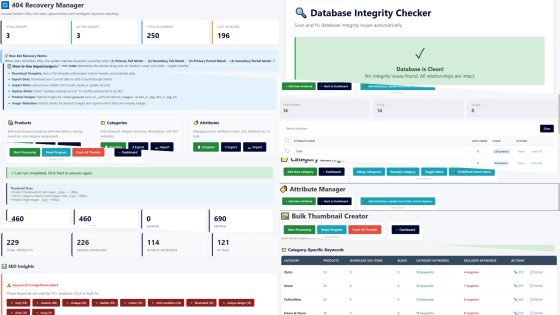
Inside LC Cart: The Intelligent Systems That Turn $137 Into $9,600 of Value
#ecommerce #SEO #smallbusiness #digitalmarketing #contentmarketing
An exhaustive breakdown of what LC Cart actually does, how the intelligent systems work, and why they're worth far more than the price you pay.
This is a follow-up to: "The Artisan Seller's Reality: Why 74% Fail on Etsy"
The Honest Value Calculation
What you're actually getting when you buy LC Cart:
$9,600 First year value (recovered revenue + avoided costs)
$6,600/year Ongoing annual value after first year
$137 One-time payment. Own it forever.
Based on realistic revenue for artisan sellers making $20,000-$50,000/year. This article shows exactly where every dollar of that value comes from.
The Core Principle: Intelligent Systems, Not Just Features
Most e-commerce platforms give you features. LC Cart gives you intelligent systems that work together.
The difference:
-
Feature: "You can create blog posts"
-
Intelligent System: "AI analyzes your products, extracts keywords, suggests related terms from groups, generates natural-language variations with validation, creates blog posts with proper SEO, and provides one-click publishing to 6 platforms"
This article breaks down each intelligent system exhaustively, shows what it would cost on other platforms, and explains why LC Cart's approach is fundamentally different.
System 1: The 404 Revenue Recovery Engine
What Other Platforms Call It
"404 redirect management" or "broken link handling"
What It Actually Is in LC Cart
An intelligent revenue recovery system that turns dead links into filtered, relevant product suggestions based on keyword extraction and price range detection.
How It Works (Exhaustive Breakdown)
Step 1: Customer Hits Broken URL
Someone clicks an old Pinterest pin, a mangled Instagram link, or mistypes your URL: yoursite.com/vintage-sapphire-ring-3467
Product was deleted 6 months ago. Traditional platforms show generic 404 page. Customer leaves. Sale lost.
Step 2: System Analyzes the URL
LC Cart 404 Recovery doesn't just log it. It intelligently extracts:
-
Primary keywords: "vintage", "sapphire", "ring" (product-focused terms)
-
Secondary keywords: Looks for descriptive terms
-
Price indicators: If URL contains numbers like "3467", system checks if it matches typical price patterns ($2000-$5000 range for sapphires)
Step 3: Matches Against Recovery Groups
You've configured recovery groups (takes 10 minutes initial setup):
Group 1 - Sapphire Jewelry:
-
Primary keywords: sapphire, ring, pendant, earrings
-
Secondary keywords: blue, vintage, natural, certified
-
Target: Search Console filtered to /sapphire+jewelry/and/2000/5000
-
Priority: 1 (checked first)
Group 2 - All Jewelry:
-
Primary keywords: ring, necklace, bracelet, jewelry
-
Target: Best-selling product OR category page
-
Priority: 2 (fallback if Group 1 doesn't match)
Match found: "sapphire" + "ring" + "vintage" matches Group 1
Step 4: Smart Redirect with Filters
Instead of dumping visitor into ALL products (overwhelming), system redirects to: /gallery/sapphire+vintage+ring/and/2000/5000
This shows:
-
ONLY products matching "sapphire" AND "vintage" AND "ring" keywords
-
ONLY products priced $2,000-$5,000 (relevant range)
-
NOT every product in your store
-
NOT irrelevant price ranges ($50 keychains or $50,000 museum pieces)
Step 5: Customer Sees Relevant Products
Visitor lands on a page showing 5-15 products that match what they were looking for. They see something similar to the deleted product. They click. They buy.
Step 6: System Tracks Performance
Recovery group logs:
-
How many hits this URL pattern gets
-
Which recovery group handled it
-
You can see which broken URLs drive the most traffic
-
You can adjust priority, keywords, or targets based on data
Real-World Scenarios This System Handles
Scenario 1: Pinterest Dead Link
Broken URL: /vintage-sapphire-ring-3467 System extracts: vintage, sapphire, ring, price indicator 3467 Redirects to: /sapphire+vintage+ring/and/2000/5000 Customer sees: 8 relevant vintage sapphire rings in $2k-$5k range Result: Conversion instead of bounce
Scenario 2: Competitor URL Sabotage
Broken URL: /adgagasapphireaadgadkgjasdga (malicious gibberish) System extracts: "sapphire" (only recognizable keyword) Redirects to: /sapphire/and/0/0 (all sapphires, any price) Customer sees: Your full sapphire collection Result: Their attack becomes your sales opportunity
Scenario 3: Email Typo
Broken URL: /blue-saphire-ring (typo: "saphire") System extracts: blue, ring (ignores misspelled "saphire" as unknown keyword) Redirects to: Blue jewelry category OR /blue+ring/and/0/0 Customer sees: Blue rings Result: Typo doesn't kill conversion
Scenario 4: Social Media URL Mangling
Broken URL: /p/ceramic-bowl/ref=xyz123abc (Instagram destroys structure) System extracts: ceramic, bowl Redirects to: /ceramic+bowl/and/50/300 Customer sees: Ceramic bowls in $50-$300 range Result: Platform's URL destruction becomes filtered landing page
The Revenue Recovery Math (Realistic for Small Sellers)
Small artisan seller scenario (annual revenue $20,000-$50,000):
Before 404 Recovery System:
-
20 people per month hit broken URLs (old pins, shared links, typos)
-
19 bounce immediately (95% leave on generic 404 page)
-
1 stays and manually searches your site
-
Maybe 0-1 of those 20 converts = $0-$200/month in lost sales
After 404 Recovery with Smart Filtering:
-
Same 20 people per month hit broken URLs
-
Auto-redirected to filtered, relevant product searches
-
12 stay (60% vs 5% because they see relevant products immediately)
-
3-4 convert = $600-$800/month recovered
Recovered revenue: $400-$600/month = $4,800-$7,200/year
Conservative estimate: $5,000/year in recovered sales
What This Costs on Other Platforms
Shopify / Redirect Hero app Basic redirects, tracks 404s, manual redirect rules. NO keyword extraction. NO price filtering. NO smart suggestions. Annual cost: $35-$59/year
Shopify / Ablestar Link Manager Advanced redirects, pattern matching, bulk operations. NO intelligent suggestions. NO filtered searches. Annual cost: $120-$240/year
WooCommerce / Redirection plugin Basic 301 redirects, manual setup only. NO intelligence. NO suggestions. Annual cost: FREE (but manual)
WooCommerce / Premium redirect plugins Better redirect management, some pattern matching. NO intelligent recovery. NO filtered suggestions. Annual cost: $49-$99/year
LC Cart / 404 Revenue Recovery Engine 16 intelligent features: Keyword extraction, price range detection, smart search filtering, priority-based matching, hit tracking, multiple redirect targets, enable/disable groups, real-world URL handling. Annual cost: $0 ongoing (included in $137) Value: $5,000/year recovered revenue
The Key Difference: Other platforms give you redirect MANAGEMENT. LC Cart gives you revenue RECOVERY. The difference between those two things is $5,000/year in your pocket.
System 2: The Marketing Product Distribution Engine
What Other Platforms Call It
"Blog functionality" or "duplicate product creation"
What It Actually Is in LC Cart
An intelligent system that generates hundreds of naturally-worded, SEO-optimized product variations with validation, duplicate prevention, and strategic keyword injection - turning 1 product into 50 ways to be found on Google.
How It Works (Exhaustive Breakdown)
Step 1: You Define Keywords Per Category (One-Time Setup)
Go to Category Keyword Manager. For your "Leather Goods" category, click Auto-Extract.
System analyzes your real products and shows 3 suggestion types:
Type 1 - Extracted from YOUR products:
-
System reads your product names: "Handcrafted Leather Wallet", "Premium Leather Belt", "Vintage Leather Bag"
-
Extracts: leather, wallet, belt, bag, handcrafted, premium, vintage
-
Shows you these keywords with checkboxes to select
Type 2 - Universal Descriptors (built-in):
-
System suggests generic quality terms: premium quality, modern design, classic style, all-purpose, minimalist, vintage-inspired
-
These work for ANY category
Type 3 - Smart Suggestions from Keyword Groups:
-
You've defined a "materials" group: cotton, linen, wool, polyester, silk, leather, denim
-
System found "leather" in your products
-
Shows you OTHER materials from that group: cotton, linen, wool (in case you also make fabric items)
You select keywords you want: handcrafted, premium, vintage, modern design, classic style, minimalist Click Save. Done.
Step 2: Generate Marketing Products
Click "Create Marketing Products" for Leather Goods category. Enter quantity: 50.
For each of your 10 real leather products, system attempts to create 5 variations.
Real product: "Handcrafted Leather Wallet - $85"
Generation attempt 1:
-
Picks keyword: "premium"
-
Tries Pattern 1 (Prefix): "Premium Handcrafted Leather Wallet"
-
Validates: Word count 4 words (max 8) PASS. Filler words 1 (max 2) PASS. Repetition check no duplicates PASS. Natural phrasing sounds good PASS.
-
ACCEPTED: Creates marketing product with SKU "handcrafted-leather-wallet_sc1"
Generation attempt 2:
-
Picks keyword: "modern design"
-
Tries Pattern 2 (Suffix): "Handcrafted Leather Wallet with Modern Design"
-
Validates: Word count 6 words PASS. Filler words 2 PASS. Repetition none PASS.
-
ACCEPTED: Creates _sc2
Generation attempt 3:
-
Picks keyword: "classic style"
-
Tries Pattern 3 (Dash): "Handcrafted Leather Wallet - Classic Style Edition"
-
Validates: Word count 6 words PASS. Filler words 2 PASS.
-
ACCEPTED: Creates _sc3
Generation attempt 4:
-
Picks keyword: "minimalist"
-
Tries Pattern 4 (Hyphenated): "Minimalist-Focused Handcrafted Leather Wallet"
-
Validates: PASS
-
ACCEPTED: Creates _sc4
Generation attempt 5:
-
Picks keyword: "vintage"
-
Tries Pattern 1: "Vintage Handcrafted Leather Wallet"
-
Validates: PASS
-
ACCEPTED: Creates _sc5
Result: 1 real wallet product -> 5 marketing product variations
Each variation gets:
-
Unique SKU with _sc suffix
-
Unique SEO-friendly URL (/premium-handcrafted-leather-wallet)
-
Keyword naturally injected into name and description
-
Complete metadata (Open Graph, Twitter Cards, Pinterest tags)
-
Full schema markup for search engines
-
Canonical tag pointing to ITSELF (not parent)
-
Shows parent product's photos and pricing
-
When customer clicks Buy, redirects to parent product for purchase
Step 3: Validation Prevents Garbage
System REJECTS names that would sound unnatural:
REJECTED Examples (what system prevents):
-
"Premium Quality Modern Design Comfortable Fit Leather Wallet" - 6 filler words (max 2) - REJECTED
-
"High Quality High Quality Wallet" - word repetition - REJECTED
-
"Quality Premium Modern Design Style Classic Craftsmanship Wallet" - 7 filler words - REJECTED
-
"Leather Leather Wallet Premium" - adjacent duplicates - REJECTED
ACCEPTED Examples:
-
"Premium Handcrafted Leather Wallet" - 1 filler word - ACCEPTED
-
"Modern Design Leather Wallet" - 2 filler words - ACCEPTED
-
"Handcrafted Leather Wallet - Classic Style Edition" - 2 filler words - ACCEPTED
20-Attempt System: For each product, system tries up to 20 different keyword/pattern combinations. If all 20 fail validation, it skips that product and reports it. You ONLY get professional, natural-sounding names.
Step 4: Duplicate Prevention Across All Batches
System tracks every product-keyword combination ever created.
-
Week 1: You generate 100 marketing products. System creates "Premium Leather Wallet"
-
Week 2: You generate 100 more. System tries to create "Premium Leather Wallet" again
-
Result: Blocked. System reports "Skipped: 1 duplicate" and never creates it twice
You can run unlimited batches. System always checks against existing combinations. No manual tracking needed.
Step 5: Google Indexes Your Pages
Each marketing product is a legitimate, unique page:
-
Unique URL that makes sense: /premium-handcrafted-leather-wallet
-
Naturally-worded title with keyword
-
Description that incorporates keyword without stuffing
-
Complete structured data
-
Proper canonical tags
Google sees 50 different products, all legitimate, all targeting different search phrases.
Customer searches "premium leather wallet" -> lands on your premium page -> sees wallet -> buys. Different customer searches "minimalist leather wallet" -> lands on your minimalist page -> same wallet -> buys.
1 product in inventory. 50 ways to be found. 50 ranking opportunities.
The Content Generation Value
Traditional approach to get 100 indexed pages:
-
Hire content writer at $30-$50 per article
-
100 articles = $3,000-$5,000
-
Writer takes 2-4 weeks to produce
-
You review, approve, manage
-
Still need to add to your site, optimize, publish
LC Cart's approach:
-
Define keywords once (10 minutes)
-
Click "Generate 100 products" (10 seconds)
-
System creates 100 fully-optimized pages automatically
-
Natural language, proper SEO, ready to index
-
Review titles, delete outliers if any (~95% are good)
-
Total time: 20 minutes
Value: $3,000-$5,000 in avoided content writer costs
What This Costs on Other Platforms
Shopify: Write 100 blog posts manually OR hire content writers OR pay for custom development to automate. NO automated generation. NO keyword injection. NO natural language validation. NO duplicate prevention. Cost: Writers $3,000-$5,000 / Custom dev $5,000-$15,000 / Time: Weeks to months
WooCommerce: Same as Shopify. Write manually or hire writers. NO automated system. Would need custom plugin development. Cost: Writers $3,000-$5,000 / Plugin dev $3,000-$10,000 / Time: Weeks to months
LC Cart / Marketing Product Distribution Engine: Auto-extract keywords, smart suggestions from groups, 4 injection patterns, natural language validation, 20-attempt system, duplicate prevention, complete SEO optimization. Generate 100 pages in 10 seconds. Cost: $0 ongoing (included in $137) Value: $3,000-$5,000 avoided costs
System 3: The Blog Content Manager with AI Generation
What Other Platforms Call It
"Blog posts" or "content management"
What It Actually Is in LC Cart
An AI-powered content generation system with multi-provider support, sophisticated prompt engineering, natural language validation, and one-click publishing to 6 platforms - creating publication-ready blog content automatically.
How It Works (Exhaustive Breakdown)
Step 1: Generate Blog Product Variations
Same as Marketing Products, but with blog SKU suffix instead of sc.
You have 50 leather products. Click "Create Blog Products" for Leather Goods. Enter quantity: 50.
System generates:
-
"Guide to Choosing Premium Leather Wallets"
-
"Modern Design Trends in Leather Accessories"
-
"Classic Style Leather Goods: A Complete Guide"
-
"Minimalist Leather Wallet Buying Guide"
-
...46 more variations
Each one is a skeleton - title and basic structure, but needs content.
Step 2: AI Draft Generation (The Intelligence)
Click "AI Draft" button on any blog product.
Modal opens with sophisticated options:
1. Select AI Provider:
-
OpenAI (GPT-4, GPT-3.5-turbo)
-
Anthropic (Claude Sonnet, Claude Opus)
-
Google (Gemini Pro)
-
Groq (fast inference)
-
Or configure your own API
2. Choose Narrative Tone:
-
Professional and authoritative
-
Friendly and conversational
-
Technical and detailed
-
Casual and engaging
3. Select Content Framework:
-
How-to guide
-
Buying guide
-
Product comparison
-
Educational article
-
Listicle format
4. Story Structure:
-
Problem-Solution-Benefit
-
Feature-Advantage-Benefit
-
Before-After-Bridge
-
Question-Answer format
Step 3: System Generates Sophisticated Prompt
Behind the scenes, LC Cart builds a detailed prompt:
You are writing a [Professional and authoritative] [Buying guide] about [Premium Leather Wallets] using a [Problem-Solution-Benefit] structure.
Product context: Handcrafted leather wallets, $85 price point, target customer is quality-conscious buyers.
Category keywords to incorporate naturally: handcrafted, premium, leather, vintage, modern design, classic style, minimalist
Master narrative preset: [Your configured template about craftsmanship and quality]
Generate:
-
An engaging title (50-60 characters)
-
A comprehensive article (400-600 words)
-
Meta description (150-160 characters)
-
5-8 relevant tags
-
URL-friendly slug
Write naturally. Incorporate keywords without stuffing. Focus on value to the reader.
Step 4: AI Generates Complete Content
System receives from AI:
-
Title: "The Complete Guide to Choosing Premium Leather Wallets: Quality That Lasts"
-
Article: 500 words of well-structured, natural content about choosing quality leather wallets
-
Meta Description: "Discover how to choose premium leather wallets that combine handcrafted quality with modern design. Expert buying guide for discerning customers."
-
Tags: leather wallets, premium leather goods, handcrafted accessories, buying guide, quality leather, minimalist wallets
-
URL Slug: guide-choosing-premium-leather-wallets
System auto-fills ALL fields in the edit form. You review, make any tweaks you want, click Save.
Step 5: One-Click Publishing to Multiple Platforms
Click "Post Now" button. Modal opens with publishing workflow:
Select platform:
-
Substack
-
Medium
-
LinkedIn
-
WordPress
-
Ghost
-
Blogger
-
Or add your own custom platforms
Copy content with one click:
-
Click clipboard icon next to Title - copied
-
Click clipboard icon next to Description - copied
-
Click clipboard icon next to Tags - copied
-
Click clipboard icon next to URL Slug - copied
-
Click copy Featured Image - image URL copied
Click "Open Platform" - opens selected platform's new post page in new tab. Paste your copied content into platform's editor. Publish.
Total time from AI generation to published on Medium: 2 minutes.
The Content Creation Value
Traditional approach:
-
Hire content writer for blog posts
-
$50-$100 per article for quality content
-
10 articles per month = $500-$1,000
-
Annual cost: $6,000-$12,000
OR use AI tools separately:
-
ChatGPT Plus: $20/month = $240/year
-
Claude Pro: $20/month = $240/year
-
Still need to manually prompt, copy, paste, format, optimize
-
No integration with your product data
-
No keyword injection system
-
No publishing workflow
LC Cart approach:
-
Generate blog skeleton with keywords (10 seconds)
-
Click AI Draft, select options (30 seconds)
-
Review generated content (1-2 minutes)
-
One-click copy to publishing platform (30 seconds)
-
Total time per article: 3-4 minutes
-
Uses your own AI API keys (you control cost)
Conservative value: $1,000/year in time savings and avoided writer costs for occasional content
What This Costs on Other Platforms
Shopify: Basic blog functionality, write posts manually. NO AI generation. NO keyword injection. NO publishing integration. NO prompt engineering. Cost: Manual labor OR hire writers $500-$1,000/month = $6,000-$12,000/year
WooCommerce: WordPress blog (built-in), manual writing, can add AI plugins separately. NO integrated system. NO keyword automation. NO validation. Cost: Manual labor OR writers $6,000-$12,000/year OR AI plugins $10-$30/month
LC Cart / Blog Content Manager: Auto keyword extraction, AI generation with 5+ providers, sophisticated prompt engineering, narrative/tone/framework options, natural language validation, one-click publishing workflow, 6 platform integrations, uses YOUR API keys. Cost: $0 ongoing (included in $137) Value: $1,000/year conservative estimate
The Key Difference: Other platforms give you a text box to write in. LC Cart gives you an intelligent content generation and publishing system that integrates with your product data, keyword strategy, and multiple AI providers.
System 4: The Category Keyword Intelligence
What Other Platforms Call It
"SEO settings" or "product tags"
What It Actually Is in LC Cart
An intelligent keyword management system with auto-extraction from real products, smart suggestions from keyword groups, master positive/negative/filler lists, and category-specific targeting that prevents garbage while suggesting relevant alternatives.
How It Works (Exhaustive Breakdown)
The 4-Layer Keyword System
Layer 1: Category-Specific Keywords Each category gets its own keyword map:
-
Pants category: denim, cotton, slim fit, relaxed fit, cargo, joggers
-
Shoes category: leather, canvas, running, hiking, casual, formal
-
Jewelry category: silver, gold, sapphire, ruby, handcrafted, vintage
When generating marketing products for Pants, system ONLY uses Pants keywords. Never mixes Shoes keywords into Pants products.
Layer 2: Master Positive Keywords (Site-Wide) Added to EVERY category automatically:
-
Your brand name
-
Premium quality descriptors
-
Universal selling points
Example: "CorundumStones", "premium natural", "certified authentic"
Layer 3: Master Negative Keywords (Site-Wide) REMOVED from every category automatically:
-
Words that contradict your brand positioning
-
Terms you never want in product names
Example: If you sell natural gemstones, negative list includes: "synthetic", "lab-grown", "fake", "imitation"
Layer 4: Master Filler Words (Site-Wide) Product names CANNOT contain these:
-
Overused marketing terms that sound spammy
-
Words that make names too long
Example: "quality", "luxury", "best", "great" (these get rejected during validation)
Auto-Extract Intelligence
Click "Auto-Extract Keywords" for a category.
System analyzes your actual products in THAT category and shows 3 sections:
Section 1: Extracted from YOUR Products
-
Reads every product name in the category
-
Identifies meaningful keywords (not stop words like "the", "and")
-
Shows frequency: "denim (8 products)", "cotton (12 products)", "slim fit (6 products)"
-
You select which ones you want with checkboxes
Section 2: Universal Descriptors
-
Shows generic quality terms that work for any category
-
Premium quality, modern design, classic style, all-purpose, minimalist, vintage-inspired, handcrafted
-
Select the ones that match your brand positioning
Section 3: Smart Suggestions from Keyword Groups
This is where it gets intelligent.
You've defined Keyword Groups (one-time setup):
Group: materials
-
cotton, linen, wool, polyester, silk, leather, denim
Group: fits
-
slim fit, regular fit, relaxed fit, oversized, tailored fit
Group: styles
-
casual, formal, business, athletic, vintage
System finds "cotton" in your Pants products. Looks at Keyword Groups, sees "cotton" is in the "materials" group. Shows you OTHER keywords from that group as Smart Suggestions:
-
linen (in case you also make linen pants)
-
wool (for wool pants)
-
denim (for jeans)
You select which ones apply. Click "Apply Selected Keywords". Done.
Why This Matters: Prevention of Contradictions
Without smart grouping, you might accidentally use:
-
"Wool cotton pants" (contradictory materials)
-
"Slim fit relaxed fit jeans" (contradictory fits)
-
"Formal athletic business pants" (conflicting styles)
With keyword groups, system knows these are alternatives, not combinations. It suggests ONE from each group, never mixes within groups.
What This Costs on Other Platforms
Shopify: Manual product tags. NO auto-extraction. NO smart suggestions. NO keyword groups. NO validation. You manually tag every product. Cost: Manual labor, hours per week
WooCommerce: WordPress tags/categories, manual tagging. NO intelligent suggestions. NO grouping logic. NO auto-extraction. Cost: Manual labor, hours per week
SEO Tools (SEMrush, Ahrefs, etc.): Keyword research tools. NO integration with your products. NO auto-application. YOU do all the work. Cost: $99-$199/month = $1,188-$2,388/year
LC Cart / Category Keyword Manager: Auto-extract from products, smart suggestions from groups, master positive/negative/filler, category-specific targeting, universal descriptors, contradiction prevention, validation built-in. Cost: $0 ongoing (included in $137) Value: $300/year (time savings + basic SEO tool)
System 5: Intelligent Search That Understands Intent
What Other Platforms Call It
"Search functionality"
What It Actually Is in LC Cart
An intent-parsing search system that understands product types, materials, colors, price ranges, and natural language queries - returning filtered, relevant results instead of overwhelming the customer with everything.
How It Works (Quick Breakdown)
Customer searches: "blue ceramic mug under 50"
Traditional e-commerce search returns:
-
Every product with "blue" (including shirts, shoes, jewelry)
-
Every product with "ceramic" (including bowls, plates, vases)
-
Every product with "mug" (including $5 mugs and $200 mugs)
-
Results: 500 products, totally overwhelming, customer gives up
LC Cart intelligent search understands:
-
Product type: mug (NOT shirt, NOT bowl, NOT vase)
-
Material: ceramic (attribute matching)
-
Color: blue (attribute matching)
-
Price: under $50 (filters price range)
Returns:
-
ONLY mugs (product type)
-
ONLY ceramic material
-
ONLY blue color
-
ONLY items under $50
-
Results: 8 products that exactly match what they asked for
Customer finds what they want immediately. Buys.
What This Costs on Other Platforms
Shopify / WooCommerce Default search: Basic keyword matching, poor results
Better search apps:
-
Searchanise: $19-$99/month ($228-$1,188/year)
-
Boost Product Filter: $29/month ($348/year)
-
Smart Search: $9.90-$39.90/month ($118.80-$478.80/year)
LC Cart / Intelligent Search Built-In
-
Intent parsing (product type, material, color, price)
-
Natural language understanding
-
Attribute-aware filtering
-
Marketing product integration
-
Fast AJAX results
Value: $180/year (vs basic search app)
The Complete Value Breakdown
404 Recovery Engine Turns broken links into filtered product suggestions. Extracts keywords and price ranges. Recovers sales from dead URLs. Value: $5,000/year (recovered revenue)
Marketing Product System Generates 100+ SEO pages in seconds. Natural language validation. Duplicate prevention. 4 injection patterns. Value: $3,000 (one-time avoided content costs)
Blog Content Manager AI generation with 5+ providers. Sophisticated prompts. One-click publishing to 6 platforms. Complete workflow integration. Value: $1,000/year (time + occasional content needs)
Category Keyword System Auto-extract from products. Smart suggestions from groups. Master lists (positive/negative/filler). Contradiction prevention. Value: $300/year (time savings + basic SEO tool)
Intelligent Search Intent parsing. Attribute filtering. Price range detection. Natural language understanding. Value: $180/year (vs search app)
Bulk Operations CSV import/export (18 features). Bulk editing (22 features). Transaction-protected operations. Database integrity checker. Value: $240/year (vs management apps)
TOTAL FIRST YEAR VALUE: $9,720 ONGOING ANNUAL VALUE: $6,720/year WHAT YOU PAY: $137 once
The Reality Check
These numbers are based on realistic revenue for artisan sellers making $20,000-$50,000/year.
$5,000/year in recovered 404 revenue assumes 20 visitors/month hitting broken links and converting at 15-20% instead of 0-5%.
$3,000 in avoided content costs assumes you'd otherwise hire a writer for 100 landing pages at $30/page.
The other values ($1,000 + $300 + $180 + $240 = $1,720/year) represent time savings and avoiding basic app subscriptions.
Total realistic value: $9,720 first year, $6,720/year ongoing You pay: $137 once
Why Traffic You Build Never Gets Lost
Every system in LC Cart is designed around one principle: protect and multiply the traffic you work to build.
Traditional Platform: Product Deleted
-
URL dies
-
404 error to visitors
-
Google drops page from index
-
All SEO work lost
-
Backlinks become dead links
-
Traffic that used to convert now bounces
LC Cart: Product Deleted
-
404 Recovery activates
-
Extracts keywords from URL
-
Shows similar products with price filtering
-
Visitor finds alternative
-
Traffic converts instead of bouncing
-
You keep the sale
Traditional Platform: Category Reorganized
-
URLs change
-
Links break
-
Rankings drop
-
Traffic decreases for weeks
LC Cart: Category Reorganized
-
Marketing products stay at original URLs
-
Continue ranking
-
Redirect to new locations when clicked
-
No broken links